
You've already built your listings with the keyword method in Stage 2, Step 6, and you've learned to read your numbers in Stage 3. This module is the full machinery behind those steps: how Etsy's algorithm actually decides who ranks, every place to find keywords shoppers really use, how to choose between them with data, and the ongoing plan that keeps your SEO working for years.
A maintenance note before we start: Etsy search rules changes over time. The specifics below reflect how Etsy search currently works, and whenever Etsy moves something important, this page will be updated.
The two-step machine
Etsy ranks listings in two steps: query matching, then ranking.
Query matching is the entry test. Etsy gathers every listing that's eligible to rank for a search by checking five places for the keyword: the title, the tags, the categories, the attributes, and the product description. If the keyword appears in any one of them, your listing is in the pool. Whether you land on page 1 or page 639 is decided next.
The ranking factors
Once the pool is gathered, these factors decide the order.
Relevancy. How closely your title, tags, and other fields match what the shopper typed. Exact matches of the phrase rank better than scattered words, which is why the roadmap taught you to use keywords exactly as shoppers type them.
Listing quality score. How well your listing performs once shoppers see it: the percentage who click, favourite, and above all, buy. Etsy wants searches to end in purchases, so conversion rate is the engine here. If two listings each get 100 views and one sells 10 while the other sells 2, the first has earned a higher quality score and a better ranking. This is the deep reason the whole of Stage 2 was engineered around conversion: every improvement to your photos, price, and copy is also an SEO improvement.
Product description. Etsy reads your description when ranking. Your opening paragraph, written to the GYC description formula with two or three keywords woven in naturally, is exactly what this factor rewards.
Recency. New and just-renewed listings get a small, short-lived boost. It fades within hours for popular search terms, and each renewal costs US$0.20, so paying to renew constantly is not a strategy. (More in the Q&A.)
Shop age. New shops get a temporary ranking boost, which is one reason the roadmap has you optimise everything before opening your doors: you want your best foot forward while the boost lasts. Don't try to game this by opening fresh shops; an established shop's accumulated reviews are worth far more.
Customer and market experience score. Etsy scores your shop on reviews (for the product and the shop), a finished About page, completed policies, and having no cases open against you. Notice the pattern: your Stage 2 maker story and policies, and your Stage 3 review engine, have been feeding this score all along.
Shipping price. Shipping cost affects ranking, and for domestic US-to-US sales, Etsy currently prioritises listings with shipping under US$6. If your US domestic shipping runs higher, you can shift part of the cost into the item price (Etsy's bulk editing tool makes this quick): charge $4 more on the item, drop shipping from $10 to $6, and you stay visible without earning less. This applies only to US domestic sales, and not to listings over $35 with a free shipping guarantee, digital products, or calculated shipping.
Listing photo standards. Listings with fewer than five high-quality images may see reduced visibility, images should be at least 2,000 pixels wide, and collages are discouraged as the thumbnail. Your Stage 2 shot list already clears this bar comfortably.
Return policy. Every listing needs a clear return policy, even if the policy is that you don't accept returns. Listings without one can rank lower, and a stated policy builds trust either way.
Shoppers' habits (context-specific ranking). Etsy personalises results based on each shopper's searches, clicks, and purchases. You can't control any individual shopper, so the practical response is universal appeal: eye-catching photos, compelling titles and descriptions, no purchase barriers, and customer relationships that bring people back.
Translations and location. Manually translating your shop into other languages earns a small boost but costs a lot of time; Etsy's automatic translation is usually the practical choice. And in the EU, Australia, and Canada, local shops rank slightly higher than non-local ones, which isn't worth moving countries over. Focus your energy on the factors you control.
And one more reader of your listings: AI shopping assistants. Etsy products now surface inside AI shopping experiences, and those systems read listings much the way Etsy's own semantic search does: through clear, descriptive, honest text. There's nothing extra to do here, and that's the point. Writing plainly for humans, exactly as the GYC formula taught you, will also optimise for AI as well.
Out of everything we mentioned, these elements are fully in your control, so they are what you should be focusing on: titles, tags, categories, attributes, descriptions, photos, shipping price, return policy, your About and policies, your review engine, and as a result, your conversion rate. Out of your hands (or don't stress over them): shop location, translations, shop age, individual shopper behaviour, and recency games.
Brainstorming keywords
Keyword research is the art of predicting what your customer will type. Start by describing your product the way a shopper would experience it in person: what it is, its material, colour, size, style, texture, smell, who it's for, what occasion it serves, and which seasons or holidays it belongs to. Buying online strips away touch and scent, so the words that restore them ("chunky knit", "lavender", "buttery leather") are often the words shoppers search.
Be straightforward rather than creative. The goal is not a poetic name; it's anticipating the exact phrase typed into the search bar.
Two outside sources sharpen the list. First, go where your customers talk: search your product category on Instagram and read the captions and comments of popular posts, because the words real people use ("soy wax", "no toxins", "biodegradable") are keywords in the wild. Second, study the first page of results for your main keyword; established competitors have usually done their research, and their titles are a free map of it.
The ten places to find keywords shoppers actually use
1. The search bar. Autocomplete suggestions are real, current shopper searches, ranked with the most popular first, and the A-to-Z method from Stage 2, Step 6 harvests them systematically: seed keyword, add a space and each letter of the alphabet, record everything relevant, repeat with new seeds. This remains the single best free (and accurate) research tool on the internet for Etsy sellers.
2. Search filters and suggested tags on top. On any search results page, the filter options (scent families, materials, and so on) are themselves keywords drawn from how Etsy organises demand. Also, there are tags suggestion at the top that contains highly relevant keywords. Add the ones that fit your product.
3. Related listings. Scroll to the bottom of any strong competitor's listing and read the related searches and categories. These are driven by real shopper behaviour: people who viewed that listing also wanted these things.
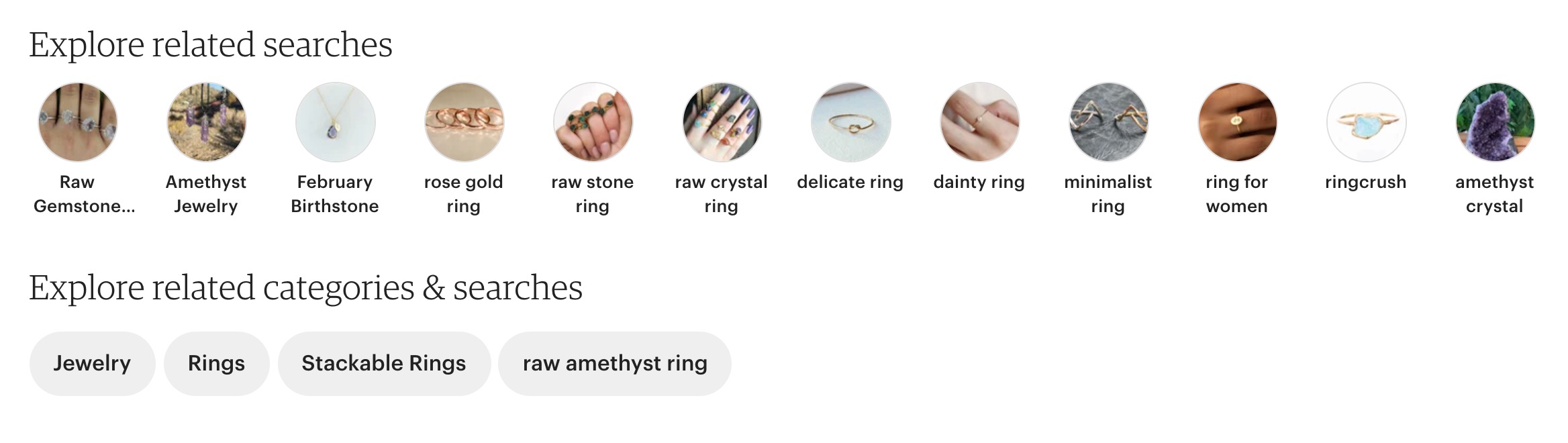
4. Competitor listings. Open the bestselling listings for your main keyword and read their titles and visible tags with a notebook open. Record only what genuinely fits your product; borrowed keywords that don't match your listing hurt more than help.
5. Your own shop stats. In your Shop Stats, open your most-viewed listings and scroll to "Search terms". These are the phrases already sending you traffic, and any relevant term you're not deliberately targeting is an invitation: add it to your title and tags and rank higher for a search you're already winning by accident.
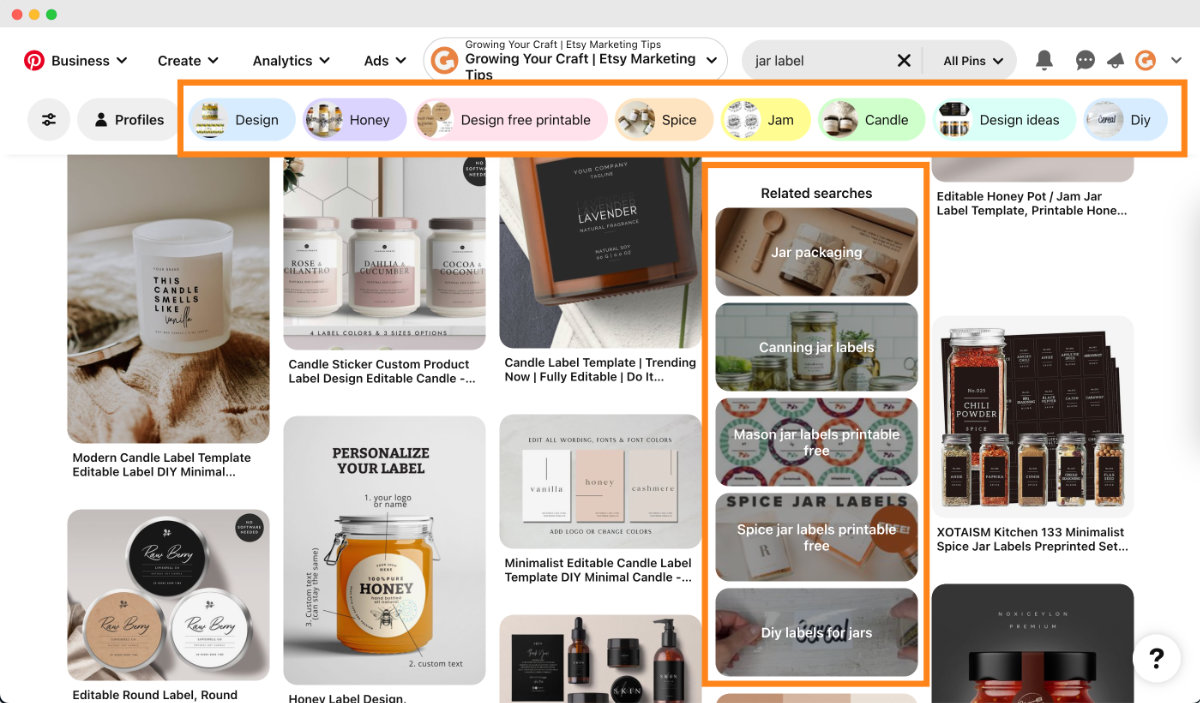
6. Pinterest. Pinterest is a search engine of future shoppers. Its autocomplete, the related-term bubbles at the top of results, and the "related searches" further down all reveal how people phrase their wants, often weeks before they buy.
7. Etsy Ads data. When you run ads (Stage 3, Step 4), each advertised listing shows the search terms it appeared for over the last 30 days. The window is short and low-budget campaigns generate thin data, so treat this as a bonus source rather than a pillar.
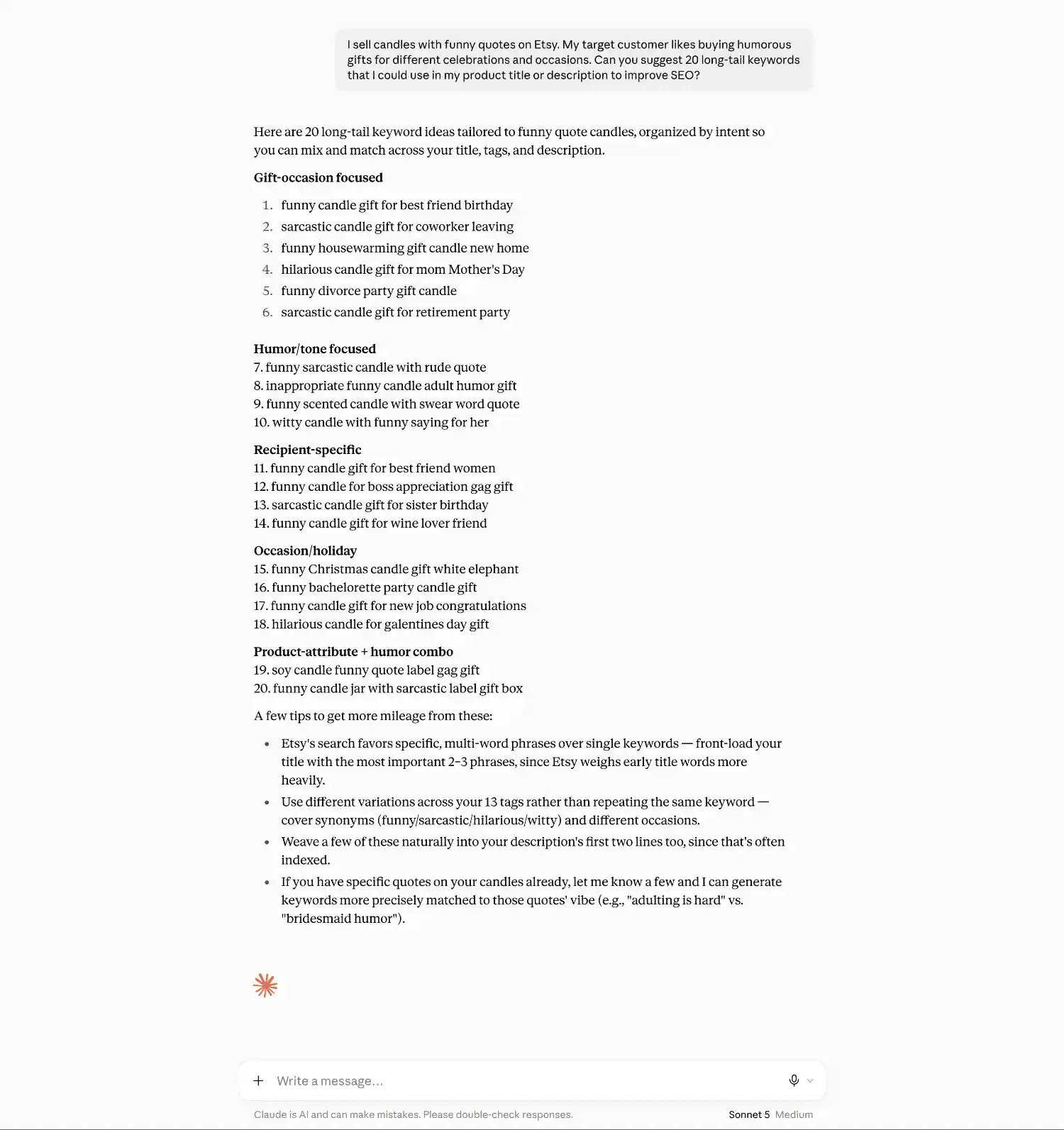
8. AI tools. Chat assistants can also help you brainstorm long lists of keyword ideas quickly: describe your product and ask for Etsy-optimised keyword suggestions. Two cautions keep this on-brand and useful: AI is your assistant for brainstorming, never the maker of your work, and these tools don't see live Etsy data, so every suggestion must be verified against the real search bar and the competition checks below before it earns a place in your listings.
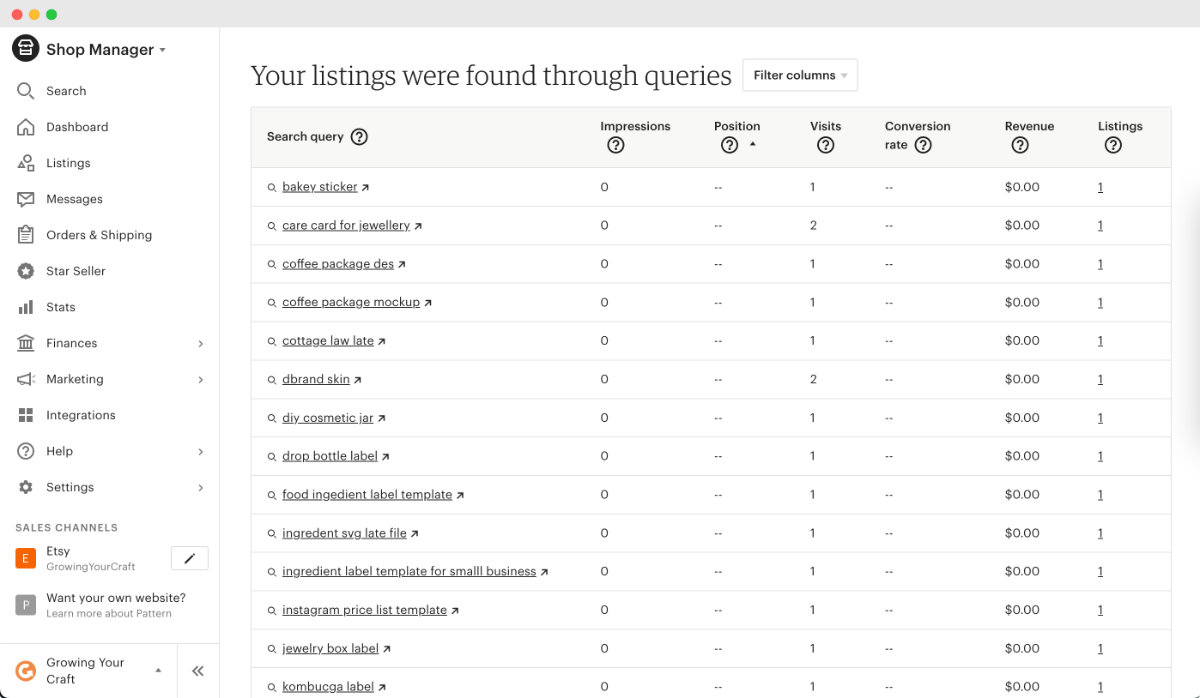
9. Etsy Search Analytics. Under Marketing, Search Analytics lists keywords your shop appears for. Sort by impressions or visits and skim the first pages for relevant terms you're not using, or demand you could serve with new products. Its filtering is limited, so you may not want to spend too much time on this one if you can't extract useful search terms in, say, 15-30 minutes.
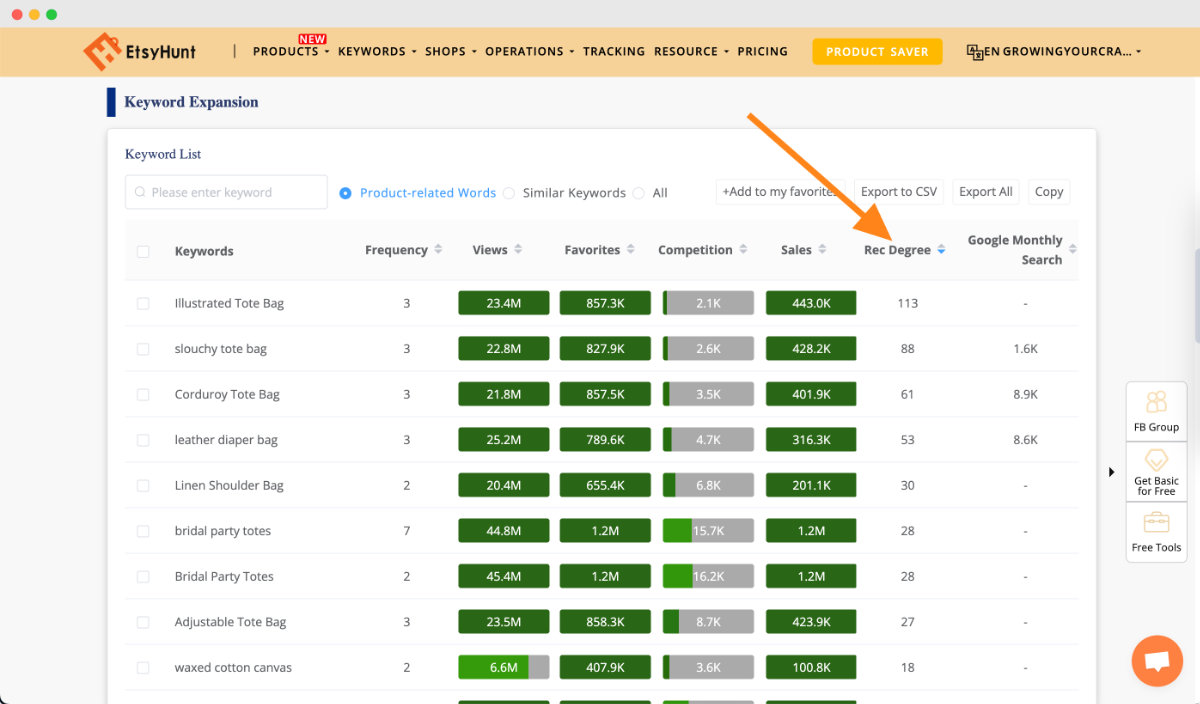
10. Paid research tools. Tools like Alura and EHunt speed everything up, and both have free or budget-friendly plans. Searching a keyword reveals related opportunities you'd never surface by hand ("illustrated tote bag" hiding behind "cotton tote bag").
Choosing the right set
(Etsy stopped showing the number of listing under a keyword. If you want to view the listing count, you'd need to use one of the Etsy market research tools that provide that data, like Alura)
The best keywords are high in demand and low in competition. Demand you've already verified, because every source above is built on real shopper behaviour. Competition takes one more check.
The result-count bands. Search each candidate keyword and note how many results it returns:
- Very high competition: 100,000+ results
- High: 50,000 to 100,000
- Average: 10,000 to 50,000
- Low: 5,000 to 10,000
- Very low: fewer than 5,000
Aim your listings at the low and very low bands. If a keyword you love is too crowded, add a word: "bath bomb" at nearly 50,000 results becomes "pink bath bomb" at under 6,000, and suddenly page one is realistic.
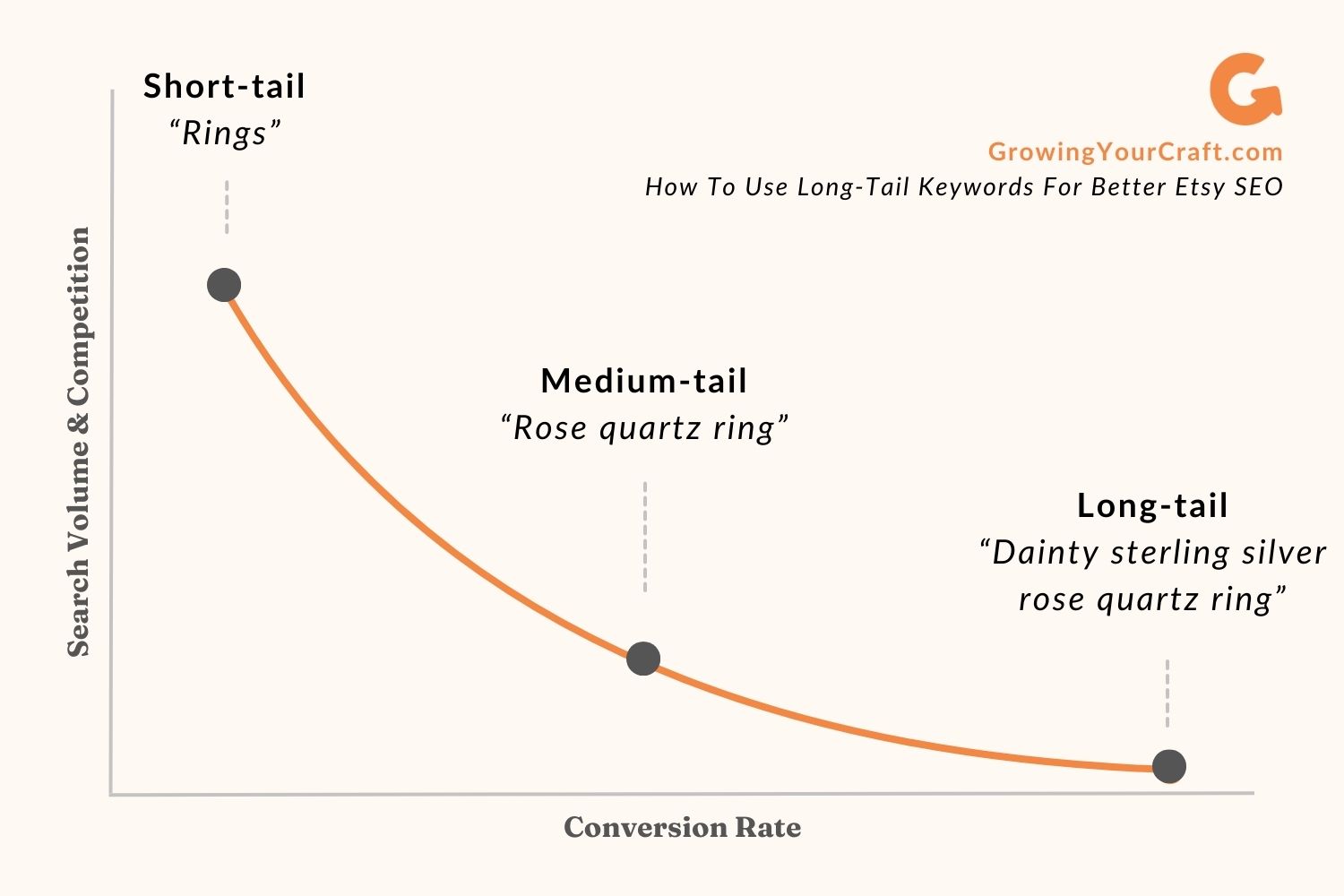
Why long-tail keeps winning. A shopper who types "jewelry" is browsing; A shopper who types "rose gold amethyst ring" knows what they want and may be ready to buy. Longer phrases (3 to 5 words) carry less competition and higher intent, which is the whole reason the roadmap builds everything on them.
One more signal: scan the results for Bestseller badges. A page crowded with them means established sellers have locked in that keyword, and your odds are better one niche-down level deeper.
Save the final list in your keyword map. It powers the next section, and you'll return to it every season.
Putting keywords to work
- Assign from specific to general. In Listings → Quick edit, place your most specific long-tail keywords first (each fits only one or two products: "lavender soy candle jar", "raw rose quartz ring"), then distribute the general ones ("non toxic candle", "gemstone jewellery gift") across the range.
- Front-load the title. Etsy weighs the first words most, and so do skimming shoppers, so the most descriptive keyword for that exact product goes first. Across your shop, vary which keyword type leads so different listings can win different searches.
- Match tags to titles. Use all 13 tags, echoing your title keywords as closely as the 20-character limit allows. Split long phrases into sensible pieces: "Goodnotes digital planner for students" becomes "Goodnotes planner", "digital planner", "planner for students". Every tag must be something a human would actually type. Try to avoid too much duplicate of any words.
- Open the description properly. The GYC formula's opening paragraph, with its two or three keywords woven in naturally, is the SEO play here, and the deeper truth is worth repeating: the description's real job is to convert, and when you write honestly about benefits and details, the keywords appear on their own.
Optimising the rest of your shop
The remaining ranking factors live outside your listings, and most are jobs the roadmap has already given you. Treat this as the connections map:
- Photos that earn clicks feed the quality score directly. The craft lives in Stage 2, Step 4 and the Conversion Masterclass deep dive.
- Reviews lift the experience score. Your Stage 3 review engine handles this: the insert card plants the seed and a friendly follow-up a few days after delivery waters it. The word-for-word templates live in the Customer Message Swipe File.
- Free shipping to the US earns priority search placement for US$35+ orders, and lower shipping helps conversion everywhere. The rule from Stage 2 stands: never eat the cost. Build shipping into your price with the calculator, then let "free shipping" do its psychology.
- Complete policies and a finished About page are ranking factors that take one afternoon, and you built both in Stage 2. If you skipped the maker story, the Maker Story Template is waiting.
- External traffic that converts (your Stage 4 list, your Stage 5 channel) signals quality and compounds your ranking over time, and with Share & Save links, Etsy refunds you 4% for bringing it.
- Honest scarcity helps conversion rate: when your real quantity is 3 or fewer, Etsy may show a low-stock warning under the listing, which nudges hesitant shoppers. Set real numbers only; manufactured scarcity breaks the trust the whole roadmap is built on.
Your ongoing SEO plan
SEO is not a one-time setup; it's a quarterly instrument, and it plugs straight into your Stage 6 rhythm.
The prime rule: If a listing gets strong views, change nothing. Don't try to make them better.
For listings with low views, the keywords are usually too competitive or too low in demand. Swap in alternatives from your saved keyword map, or re-run the research for that product, then give the change a few weeks before judging.
Refresh seasonally. Shopper language shifts with the calendar, so your bestsellers get seasonal long-tail keywords before each gifting peak, exactly as your promotion planner schedules.
And watch for landscape shifts. The search bar's suggestions change as behaviour changes, and sometimes a whole new demand appears overnight. When the pandemic hit, "face mask care instruction" went from nothing to trending, and my shop was one of the earliest shops serving it. Use your feed radar to catch keywords early, like I did.
Quick answers
Should I repeat categories and attributes as tags? No. Etsy already treats them as tags, so repeating them wastes your 13 slots.
Do plurals matter? No. "Dress" and "dresses" are the same to Etsy.
Is it bad to use the same keywords on every listing? It won't penalise you, but it limits the searches your shop can win. Vary them so every listing hunts different ground.
Is renewing regularly a legit strategy? No. The recency boost is small, lasts hours, and costs US$0.20 each time. It adds up to paying for nothing.
Does the listing video affect ranking? Not directly, but a good video improves the shopper's experience and conversion, which lifts ranking indirectly. (It's also your human-made proof; see Stage 2, Step 5.)
Does the number of photos matter? Beyond the five-image quality bar, more photos help only because they answer more questions and convert better. Conversion is always the mechanism.