


For years, Etsy sellers have been asking for one thing: Transparency.
We’ve relied on third-party tools like eRank, Marmalead, and EverBee to tell us what buyers are searching for. And while those tools are fantastic, they have always had to rely on estimates. They estimate buyer search volume using data points like clickstream data, favourites, and keyword rankings to make an educated guess at how popular a keyword is.
That has finally changed.
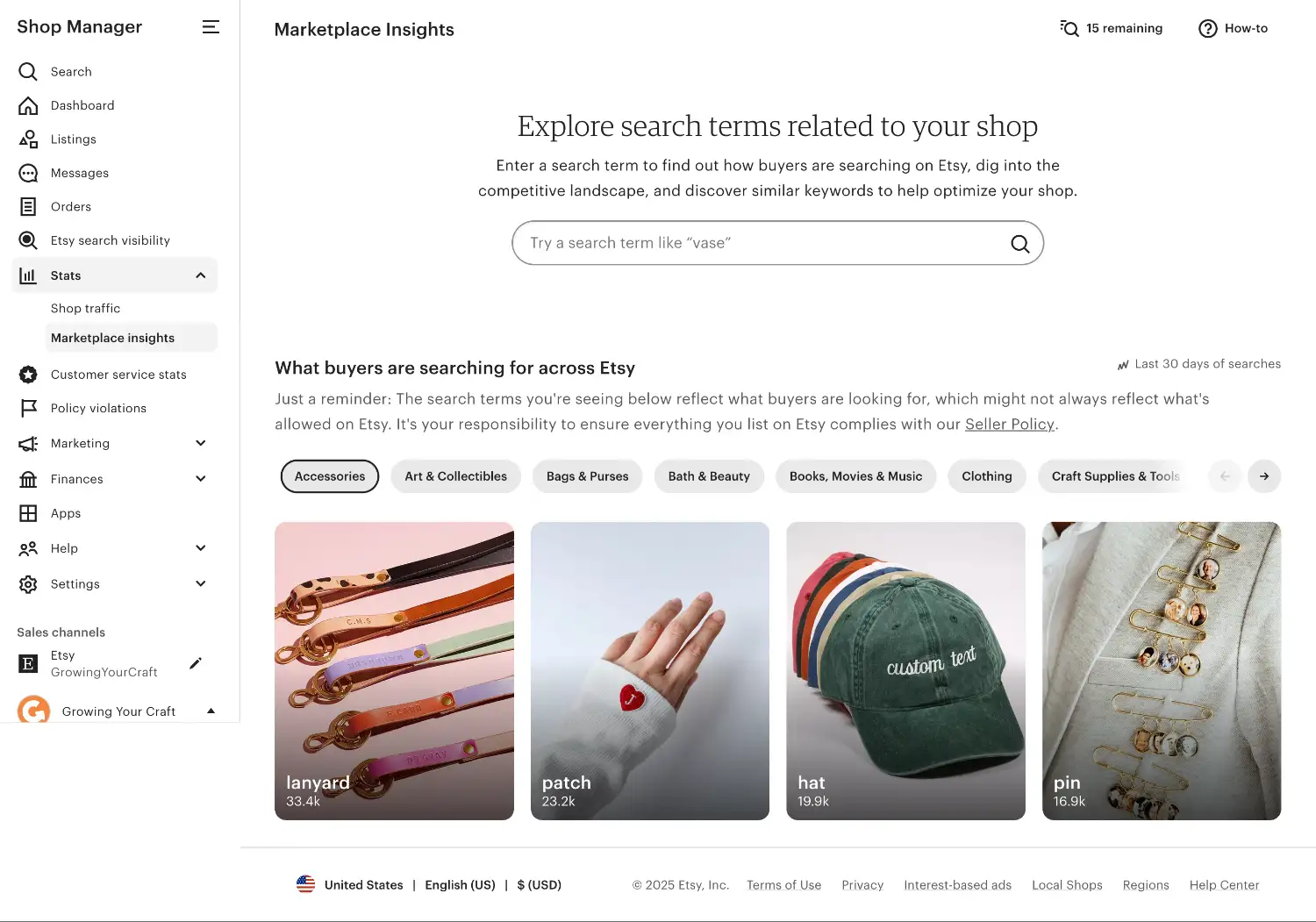
With the introduction of Marketplace Insights (located on your shop dashboard under 'Stats'), Etsy has finally let sellers access real buyer search data for the first time.
In this guide, I want to walk you through exactly what Marketplace Insight is, how to make the best use out of it, and how does it compare to established SEO and research tools.
Let's get started.
Real Buyer Data vs. Estimates
If you've used third-party SEO and keyword research tools (like eRank and Marmalead) before, the interface of Marketplace Insights will look familiar. But there is a critical difference in the quality of the information.
When you see a search volume number in Marketplace Insights, that is real buyer data, not an estimate.
If Etsy says "Crochet Sweater" had 17.6k searches in the last 30 days, that is the exact number of times real human beings typed that phrase into the search bar.
This is the first time Etsy has given us this piece of information. Previously, many sellers are making decisions based on the estimated data from third-party tools. But now, we can validate those assumptions with the actual Etsy data. This allows you to plan your next move with more confidence.
And while third-party tools can pull the number of competing listings via Etsy's API, having the Search Volume and Competition Count side-by-side in one dashboard also makes it convenient to see the supply vs demand for any given keyword.
How To Use Etsy Marketplace Insights
When you type a keyword into Marketplace Insights, you are presented with three sections of information. Here is how I recommend using them to get the most value out of the tool.
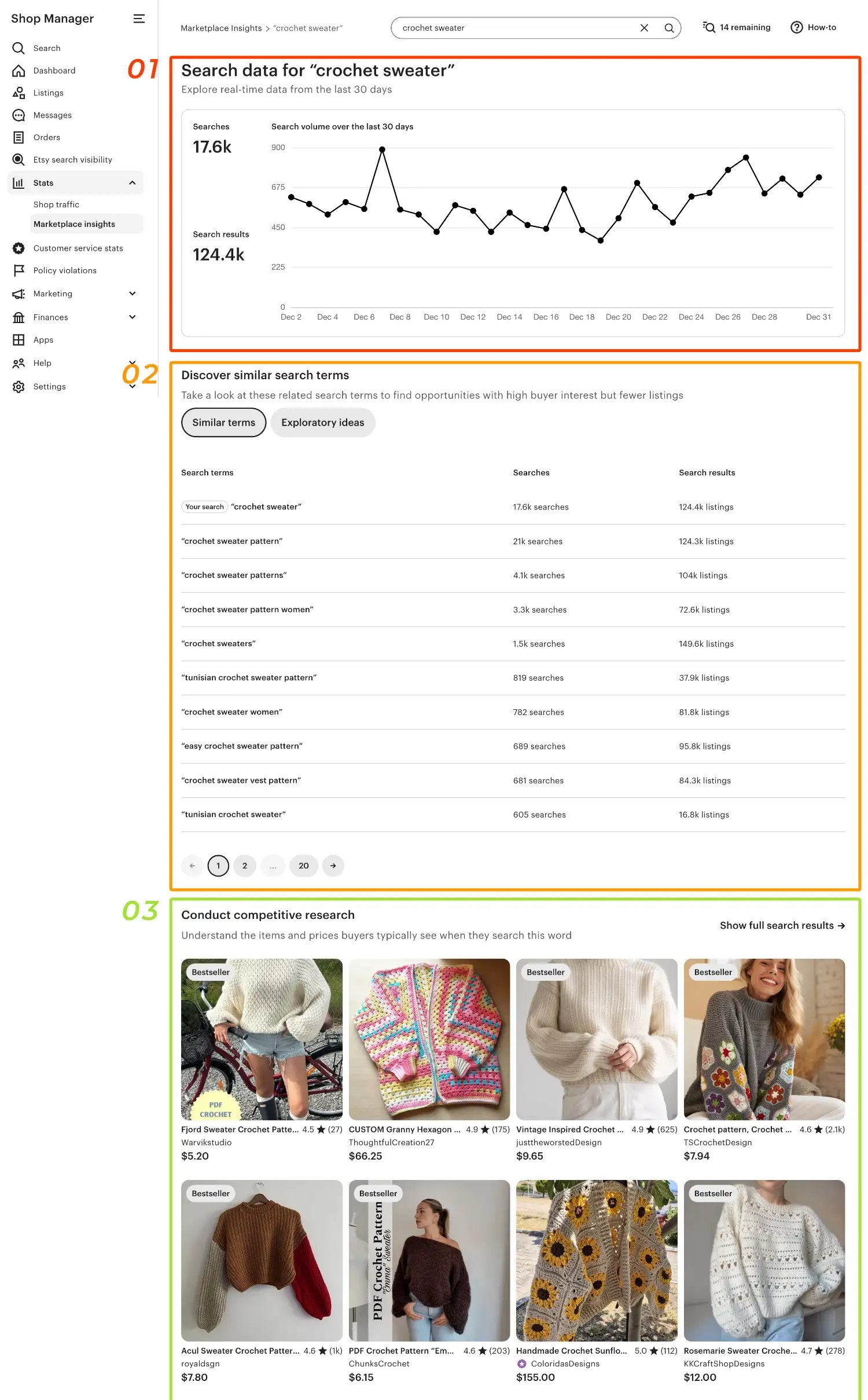
01 - The Graph - Check For Short-Term Volatility
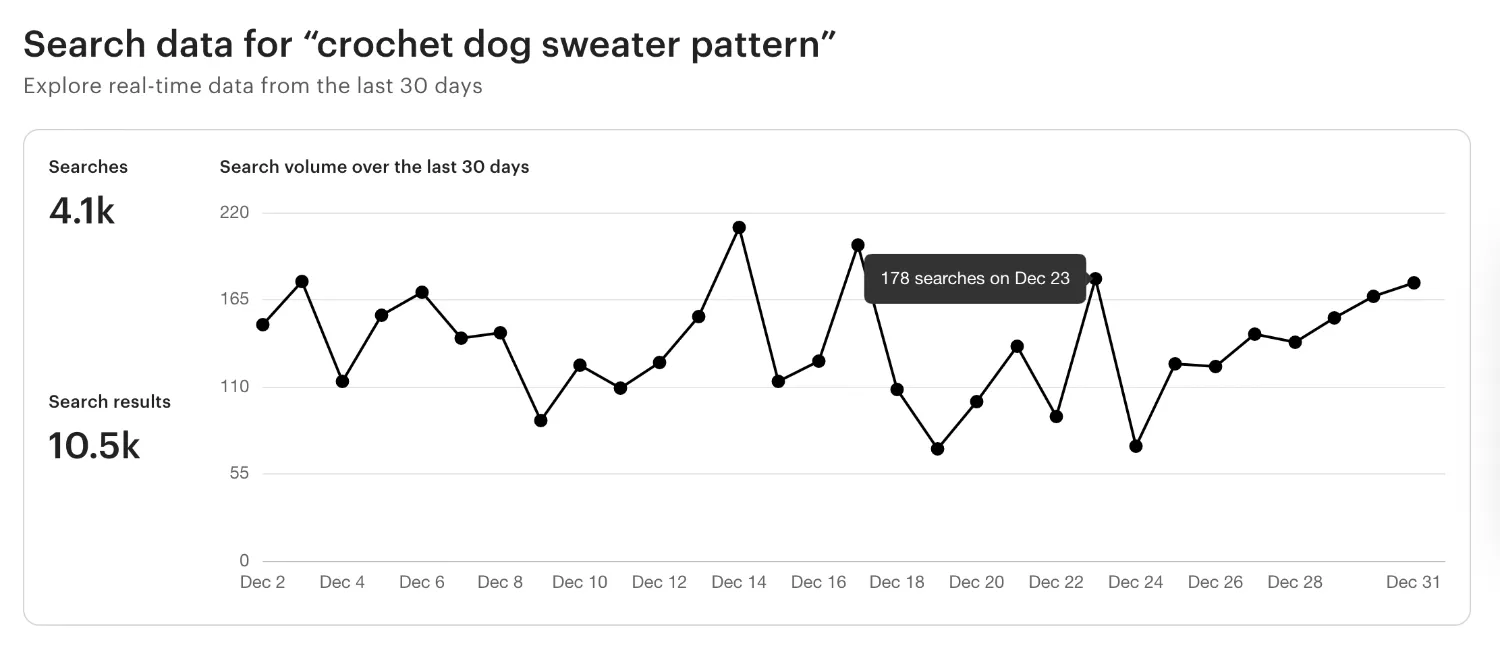
At the top of the page, you will see a line graph showing search volume over the last 30 days. To be honest, for many products, a 30-day window is simply not long enough to see seasonality or long-term demand. For that, third-party tools with 12-month historical data are still superior. However, this graph is useful for spotting immediate trends, which could be useful for viral products from social media trends.
02 - The Keyword Tabs: "Similar Terms" vs. "Exploratory Ideas"
This is the core of the tool. However, looking at the data, the difference between these two tabs can be subtle. It’s important to understand what Etsy is actually telling us here.
Similar Terms
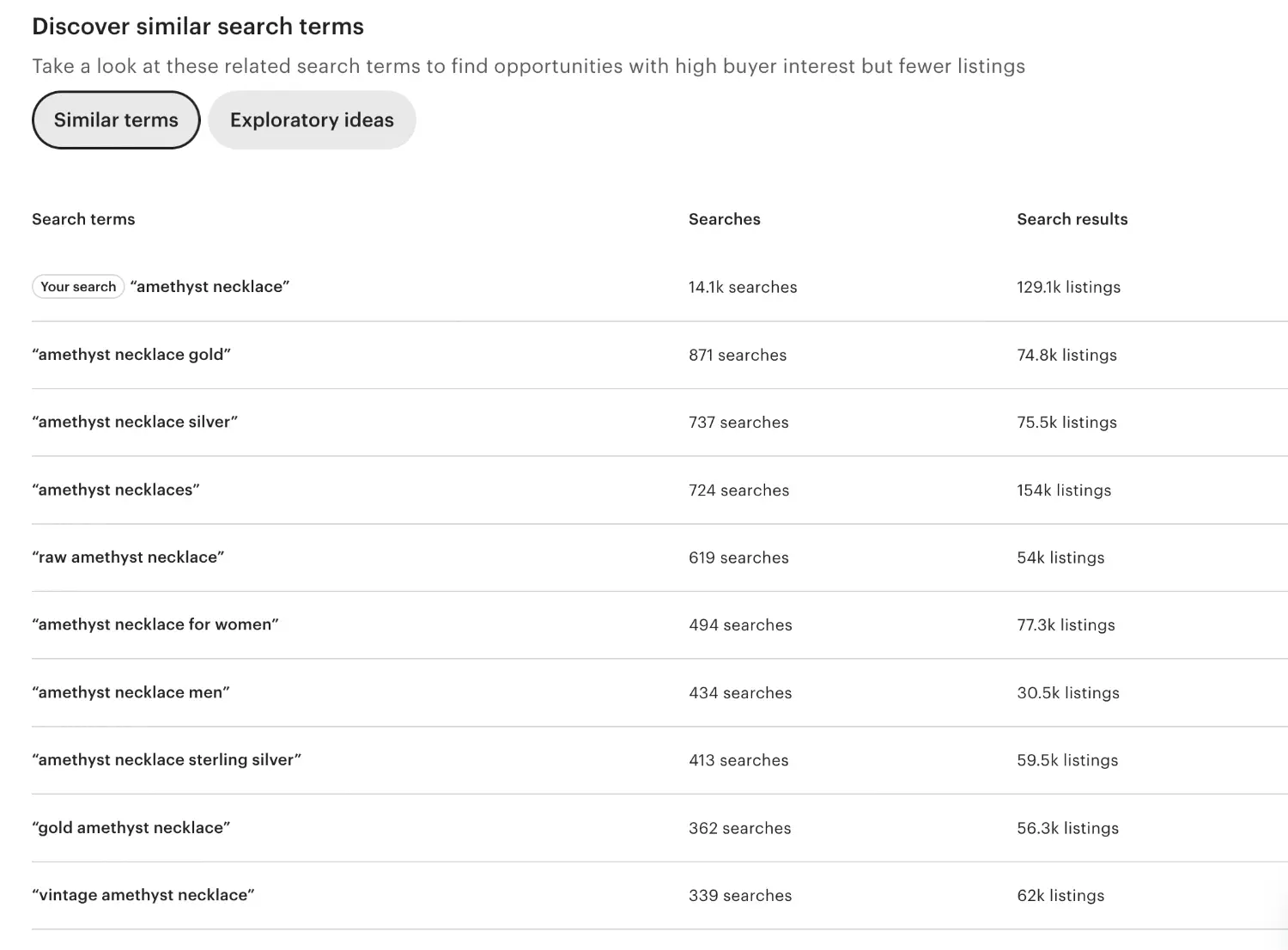
This tab usually contains the keywords that are closely related to the one you enter. It shows you the slight variations in how people type, and different ways to describe the same product.
For example, if you search "Amethyst Necklace", this tab shows variations like "amethyst necklace for women" or "amethyst crystal necklace". You can use this to optimise your listing tags and titles. If your title says "amethyst necklace", adding "for women" could help you capture extra targeted traffic given that your product fits.
Exploratory Ideas
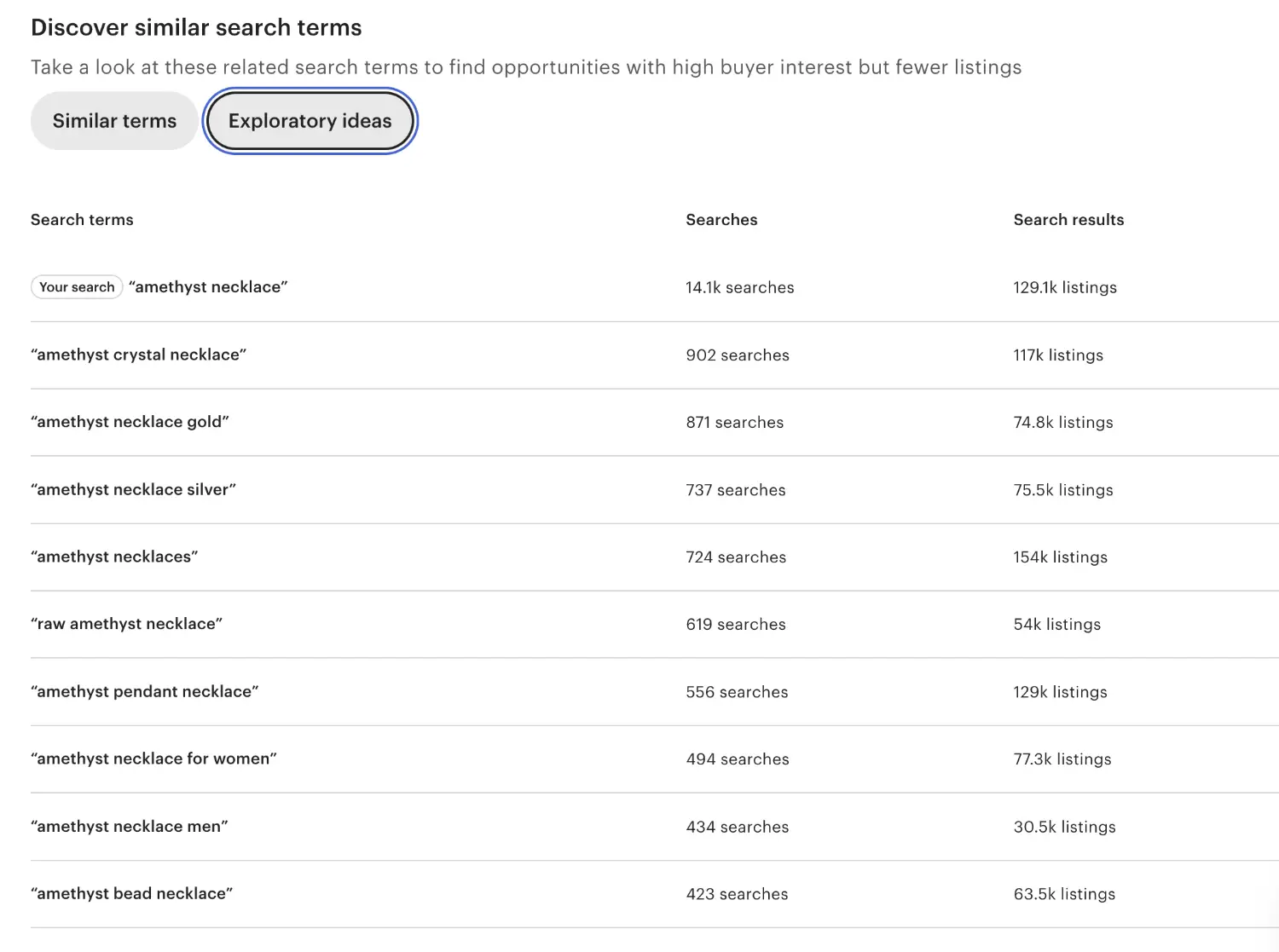
You might expect this tab to show you related products. In this example, when I type "amethyst necklace", I was expecting the exploratory ideas to point me towards new products like "amethyst bracelet" or "citrine necklace"). However, the data Etsy shows is something not what I expected.
Etsy seems to use this tab to show Search Refinements - the specific attributes buyers look for when the broad term is too vague. In the "amethyst necklace" example, it gives extra keywords like:
- "Amethyst Necklace Gold" (871 searches)
- "Amethyst Necklace Silver" (737 searches)
- "Amethyst Necklace Men" (434 searches)
So you can use this tab for Product Targeting. This list tells you what kind of amethyst necklace buyers want. For example, if you only sell silver, but the data shows higher searches and lower search results for gold, you’ve identified a new opportunity for a new product.
Tip: You can click on any of these keywords to start a new search.
Overall, the tool is useful with data that sellers haven't had access to before, but Etsy's keyword categorisation and selection of keywords could be more refined. When that happens, you may have to keep clicking on keywords to start new searches, and digging deeper until you find a demand/competition ratio that reveals a new opportunity.
03 - The Listings
At the bottom of the page, Etsy displays a section featuring top-ranking items. This section doesn't show you any new information, so I wouldn't spend too much time over-analysing this section. However, it is useful for getting a general idea of what is currently ranking well. A quick scroll will show you the average price points, the thumbnail photo styles buyers are responding well, and your biggest competitors.
The Wishlist for Etsy Marketplace Insights
While Marketplace Insights is a big step forward for Etsy, it isn't a complete replacement for third-party tools just yet. There are a few features that I really hope Etsy will add in the near future:
- Longer Period of Data: Currently, the tool only shows the last 30 days. This is great for spotting immediate trends, but it makes it hard to plan for seasonality. Third-party tools provide longer time period of data so you can see if a trend is rising or falling year-over-year.
- Search Volume Change & Trend: A raw number (like 14k searches) is useful, but context is better. I want to see percentage change columns. Is this keyword up +20% from last month? Is it down -50% compared to this time last year? Knowing the direction of the trend is just as important as the volume.
- Advanced Filtering: Sifting through the "Exploratory Ideas" tab can be time-consuming because of irrelevant results. We need the ability to filter out specific words. For example, if I sell physical jewelry, I want to filter out the word "Digital" or "Pattern" so I don't waste time analysing DIY listings.
- Engagement Metrics (Views & Visits): Search volume tells us about exposure, but it doesn't tell us about interest. I would love to see data on Average Views or Visits per keyword. To protect individual seller privacy, this could be an aggregate number (e.g., "Top 10 listings for this keyword average 500 visits/month"). This would help us identify keywords with high demand and weaker listings (high search, low visits) vs high demand, high quality competition keywords (high search, high visits).
Is Etsy Marketplace Insights Worth It?
So is Marketplace Insights worth trying? Absolutely. If you want to know what is trending right now, and you want the confidence of knowing you are looking at real buyer data rather than estimates, this is the best tool on the market, even though it has some obvious drawbacks at the current stage.


