
You've defined your "why" and you've chosen a powerful lead magnet. Now it's time to build the engine that will run your email marketing system.
This chapter will walk you through the four technical steps to get your system up and running, from choosing the right software to automating the delivery of your lead magnet. This guide is easy to follow and no advanced technical skills are required.
Step 1: Choose Your Email Marketing Service (ESP)
An Email Service Provider (ESP) is the software that stores your subscriber list, sends your emails, and tracks your results. With dozens of options available, here are the 5 features you should look for as an Etsy seller:
- Email Automation: The ability to create a "welcome series" of emails that sends automatically when someone subscribes. This is non-negotiable.
- List Segmentation: The power to divide your subscribers into smaller groups (e.g. "Shoppers" vs "Customers") so you can send them targeted, relevant content.
- Ease of Use: An intuitive, drag-and-drop editor for both emails and landing pages.
- Analytics: Clear and simple reports that show you open rates, click-through rates, and unsubscribes.
- High Deliverability: A good reputation for ensuring your emails land in the primary inbox, not the spam folder.
Popular ESP Choices for Etsy Sellers
- MailerLite: A favorite for beginners due to its generous free plan, ease of use, and powerful automation features.
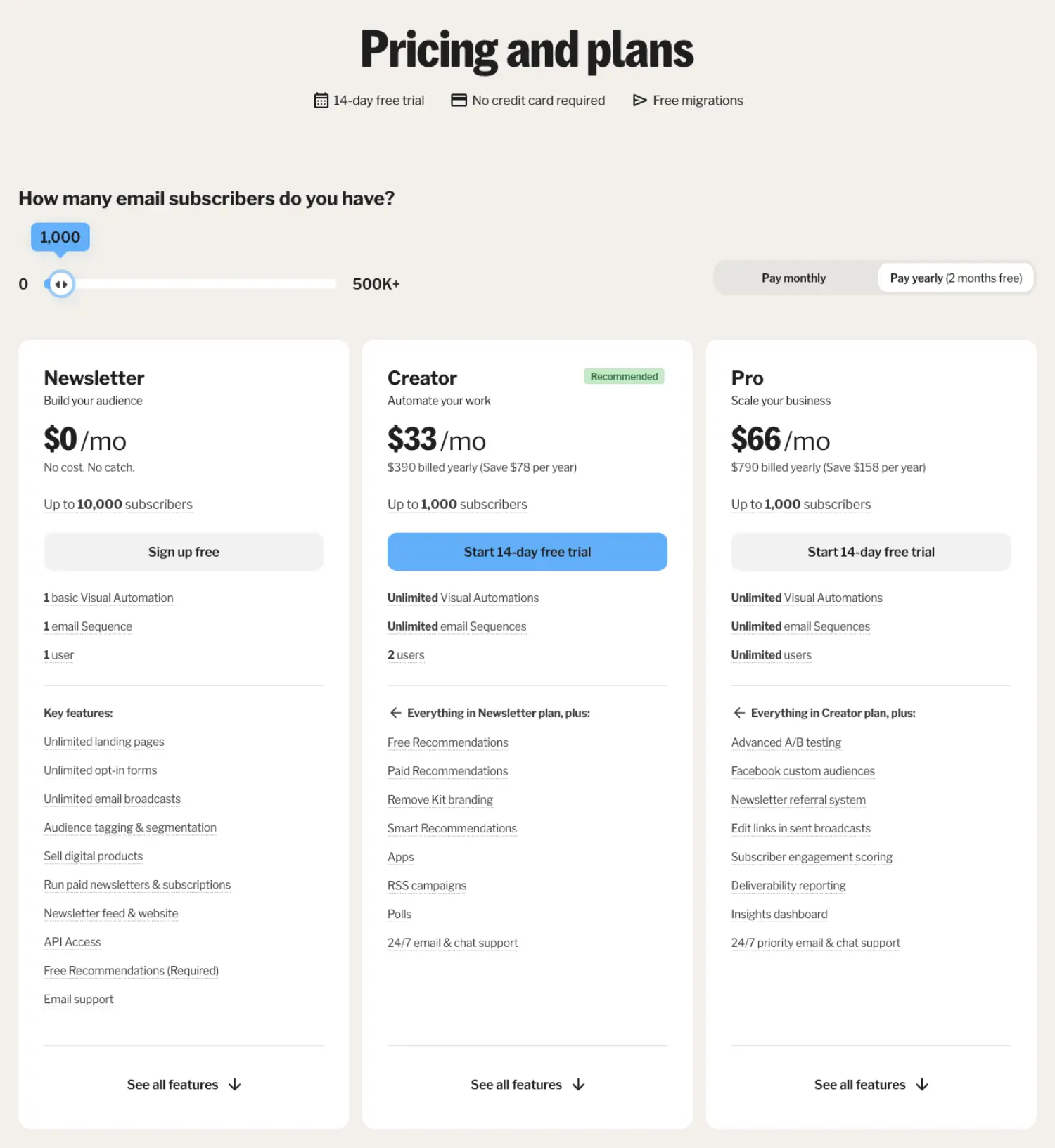
- ConvertKit: A more powerful (and more expensive) option built for creators, with excellent automation and segmentation capabilities.
Both of these offer a free plan, so I'd recommend setting up for a free account to see which interface you find most comfortable.
An Important Note on Direct Etsy Integrations
Some ESPs (like AWeber) offer a direct integration with Etsy. This sounds great, but you must understand one crucial Etsy rule:
You CANNOT automatically add past buyers to a promotional email list without their explicit, opt-in consent. Doing so violates Etsy's Terms of Service and global anti-spam laws (like GDPR and CAN-SPAM).
The benefit of these integrations is that they can automate the process of asking your customers to opt-in. They do not give you permission to email your entire order history. Your shop can be shut down for this. Always require subscribers to sign up themselves through a form.
Step 2: Set Up Your Audience Segments
Before you get a single subscriber, it's wise to set up your lists (or "groups"/"tags" depending on your ESP). This is called segmentation. For an Etsy shop, you only need two to start:
- Shoppers (Potential Customers): This list is for people who signed up for a lead magnet like a discount or giveaway but haven't bought yet.
- Customers (Past Buyers): This list is for people who signed up for a post-purchase lead magnet, like a product care guide.
By separating them now, you can send tailored messages later without any extra work.
Step 3: Create Your Sign-Up Landing Page
A landing page is a simple, single web page with one goal: Get the visitor to enter their information into your sign-up form.
It’s a myth that this page needs to be a design masterpiece. Clean, simple, and focused is what converts. Most ESPs have built-in landing page creators that make this incredibly easy. Here is a simple checklist for your high-converting email signup landing page:
- Your Logo: Placed at the top for brand recognition.
- A Killer Headline: This should clearly state the benefit of your lead magnet. (e.g., "Get 10% Off Your First Order!" or "Download Your Free Jewelry Care Guide")
- A Brief Description: One or two sentences explaining what they get and why it's valuable.
- A Relevant Image (Optional): A photo of your product or a mock-up of the digital guide can increase conversions.
- The Sign-Up Form: Keep it simple! The more fields you ask for, the lower your conversion rate. All you really need is:
- First Name
- Email Address
Your ESP will give you a unique URL for this landing page (e.g., yourbrand.ck.page/signup). This is the link you will share to get subscribers.
Step 4: Automate Your Lead Magnet Delivery
The magic of email marketing is automation. You need to set up a system that instantly sends the promised lead magnet to every new subscriber. This is typically done in the very first email of your automated "welcome sequence."
Method 1: For Text-Based Lead Magnets (Coupons, etc.)
This is the easiest. Simply write the coupon code or giveaway confirmation directly into the body of your first automated email.
Method 2: For Digital Files (PDF Guides, Checklists, etc.)
If your lead magnet is a file like a PDF, you have two options:
- Direct Upload: Many ESPs allow you to upload the file directly and attach it as a link in your email.
- Cloud Storage Link (Universal Method): If your ESP doesn't support file uploads, use a free service like Google Drive or Dropbox.
- Upload your PDF file to Google Drive.
- Right-click the file and select "Get link"
- In the pop-up, change the permission from "Restricted" to "Anyone with the link." This is a critical step!
- Copy the link.
- Paste this link into your welcome email behind a button that says "Download Your Guide Now!"
With these four steps complete, your email marketing machine is built and ready for fuel. Now, let's go get some subscribers in the next chapter.